
Do QR Codes Improve Restaurant SEO? What They Actually Do
Learn whether QR codes improve restaurant SEO, what noindex means for a digital menu, and where restaurants should publish content that customers can find in Google.
Do QR codes improve restaurant SEO? Not directly. A QR code gives a customer a fast way to open a menu from a table, but it does not make the menu rank in Google by itself. Search visibility depends on crawlable, indexable pages with useful information about the restaurant.
ServeScan public menu pages intentionally use noindex. This means customers can still open the menu from a QR code or direct link, while the menu page is not intended to appear in Google Search. Google explains that a noindex rule removes a page from Search results after Google crawls the rule. Read Google’s noindex documentation for the technical details.
Does a QR code improve restaurant SEO?
A QR code is an access tool, not a direct ranking signal. It connects a printed table sign to a digital destination. The code can make it easier for a customer to open your menu, but scanning it does not replace the SEO work needed on your website or local business profile.
A QR menu can still be useful for your business because it helps customers access current menu information in the venue. Its main job is to support the in-person visit. Your indexable website pages and business listings have a different job: helping people discover the restaurant before they arrive.
Can Google read the words inside a QR code?
Do not treat a QR image as searchable menu text. The words encoded in the pattern are a destination for a scanner, not a replacement for clear text on an indexable page.
If you want people to find a restaurant through searches such as these, write the information in normal page text:
- best coffee shop in South Jakarta
- halal breakfast restaurant near Bandung station
- cafe with outdoor seating in Surabaya
- nasi goreng and iced coffee menu in Yogyakarta
Use these phrases only when they accurately describe the business. Put them in useful headings and sentences on pages that are meant to be found in Search. Do not hide a list of keywords inside a QR image.
What does noindex mean for a ServeScan public menu?
Noindex tells search engines not to include a page in their Search results. It does not stop a customer who has the correct link from opening the page in a browser.
For a ServeScan menu, the intended flow is simple:
- A customer sees the QR code on the table.
- The phone camera opens the menu link.
- The customer reads the current menu on the phone.
- The restaurant keeps its searchable business information on separate indexable pages.
This separation is deliberate. A live menu can be useful to people inside the restaurant without becoming a page that competes in Search for the restaurant’s broader website content.
Where should restaurant SEO content live?
Publish search-focused information on pages that are intended to appear in Google. Depending on the business, that can include:
- The main restaurant website page.
- A location or contact page with the correct address, phone number, and opening hours.
- A page for a specific service, such as catering, breakfast, or private dining.
- Helpful articles that answer real questions from diners.
- The restaurant’s Google Business Profile.
Keep the information consistent across these places. A customer should not find one opening time on a website and a different time on a business listing.
The QR menu has a supporting role. It can give guests the detailed current menu after they arrive, while the indexable pages explain who you are, where you are, what you serve, and when customers can visit.
What should an indexable restaurant page contain?
An indexable restaurant page should answer the questions a potential customer has before visiting. Include:
- The restaurant name and type of food.
- The city, neighborhood, or area served.
- The full address and an easy way to contact the business.
- Opening hours that are kept current.
- Important dining options, such as dine-in, takeaway, delivery, outdoor seating, or reservations.
- A short description of popular dishes or menu categories.
- Clear links to relevant pages.
Write for people first. A page that repeats the phrase “restaurant menu” in every sentence is harder to read and does not give search engines useful context.
If the full live menu is available through a ServeScan QR code, explain that customers can scan the code at the venue. Do not claim that the noindex menu page itself will rank in Google.
Should restaurant keywords be placed inside the QR code?
No. The QR pattern should be easy for a phone camera to scan. It is not a place to add SEO text.
Place relevant terms in visible content around the QR code when they help the customer understand the action. For example:
- Scan to view today’s menu.
- Scan to view drinks and desserts.
- Scan to see the current cafe menu.
These instructions help people use the code. They do not turn the QR image into a ranking shortcut.
For the restaurant’s search visibility, use natural wording on the website and business profile instead. Google’s SEO Starter Guide recommends creating helpful content and making it easy for search engines to understand the site.
Can a QR menu help the customer experience without helping rankings?
Yes. Search ranking and in-venue access are different jobs.
A QR menu can help a customer:
- Open the menu from the table with a phone camera.
- Check current prices and item details.
- Browse sections without waiting for a printed booklet.
- Read the menu on a personal screen.
- Return to the same menu link during the visit.
These benefits do not require the public menu page to be searchable. They require a working QR code, a readable mobile page, and accurate menu content.
If a customer cannot scan the code, read our guide on fixing a QR menu that is not scanning.
What is a practical restaurant SEO and QR menu workflow?
Use each channel for the job it handles best:
- Create an indexable website page that explains the restaurant, location, food, and services.
- Keep the Google Business Profile accurate and complete.
- Publish useful articles that answer specific customer questions.
- Use a ServeScan QR menu for current in-venue menu access.
- Place a clear scan instruction beside the QR code.
- Keep the menu content and searchable business information accurate.
This approach avoids a common mistake: expecting a QR code to do the work of a website. A QR code helps a person take action. A searchable page helps a person discover the business.
Frequently asked questions about QR codes and restaurant SEO
Can a QR code make my restaurant rank higher on Google?
Not by itself. A QR code helps customers open a destination from a printed surface. Restaurant search visibility comes from useful, indexable pages, accurate business information, and a clear local presence.
Will a noindex restaurant menu appear in Google Search?
No. A page with a valid noindex rule is intended to stay out of Google Search results. Customers can still open it through a direct link or a QR code.
Is it bad for SEO if my digital menu is noindex?
Not when the menu is intentionally used for direct access rather than search discovery. Keep the restaurant’s discoverable information on indexable website pages and its Google Business Profile.
Should I put my entire restaurant menu on an indexable page?
That depends on your website and content plan. The important point is to place useful restaurant information on pages that are meant to be found, while using the QR menu for the current in-venue experience. Do not expose a page to Search only because you expect a QR code to improve rankings.
Can I use ServeScan for a QR menu if the public menu is noindex?
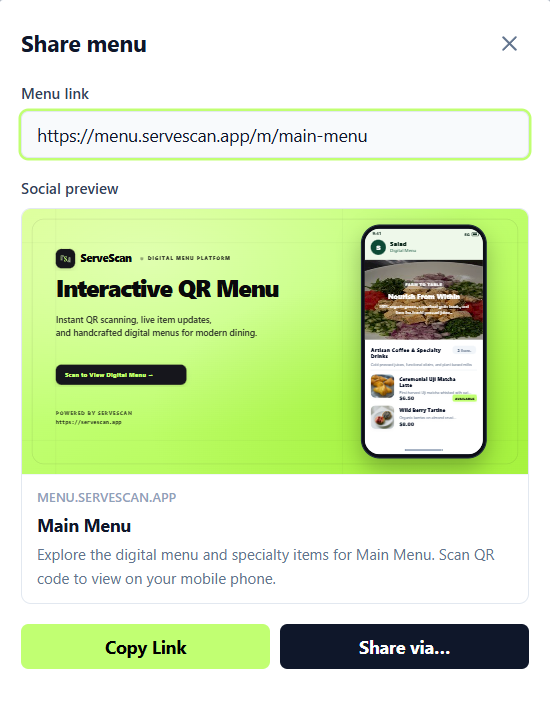
Yes. Customers can use their phone camera to open the menu from the table. ServeScan also gives you a shareable menu link from the Share menu panel. Click Copy Link to copy it in one click, then share the link directly or use Share via….
If you need to create a menu and table QR code, sign in at dashboard.servescan.app.
Summary
A QR code does not directly improve restaurant SEO, and a noindex public menu is not intended to rank in Google. The QR code helps customers open a current menu at the table. Your website pages, Google Business Profile, and helpful articles should handle restaurant discovery. Use each channel for its intended purpose, then keep the information accurate across all of them.